Creating multi-step forms can significantly enhance user experience by breaking down lengthy processes into manageable sections. In this post, I’ll share my experience building multi-step forms in ASP.NET Core MVC, particularly within the registration flow using Identity Framework.
Approach 1
My initial approach involved creating separate views for each step of the form. The plan was that each view would correspond to a specific section of the registration process, such as personal information, address information, etc.
I created a view called Submit.cshtml as the final step and the Register.cshtml as the initial view whenever you click on the register link.
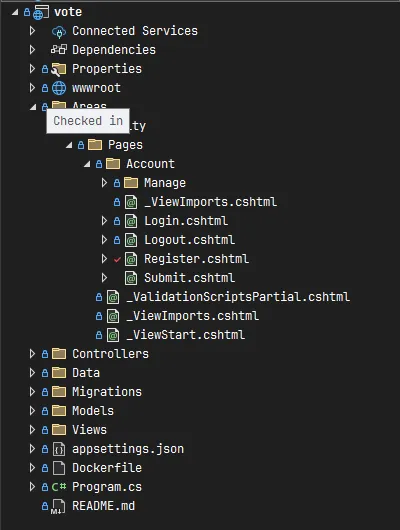
I moved all the code that was on Register.cshtml.cs to the newly created Submit.cshtml.cs. The most important section of the code in the cshtml.cs file is the OnPostAsync method. The method creates the user using the provided information during the registration phase. Therefore, moving all the code to the last page of the view made a lot of sense.
The OnPostAsync method:
public async Task<IActionResult> OnPostAsync(string returnUrl = null)
{
    returnUrl ??= Url.Content("~/");
    ExternalLogins = (await _signInManager.GetExternalAuthenticationSchemesAsync()).ToList();
    if (ModelState.IsValid)
    {
        var user = CreateUser();

        user.FirstName = Input.FirstName;
        user.LastName = Input.LastName;

        await _userStore.SetUserNameAsync(user, Input.Email, CancellationToken.None);
        await _emailStore.SetEmailAsync(user, Input.Email, CancellationToken.None);
        var result = await _userManager.CreateAsync(user, Input.Password);

        if (result.Succeeded)
        {
            _logger.LogInformation("User created a new account with password.");

            var userId = await _userManager.GetUserIdAsync(user);
            var code = await _userManager.GenerateEmailConfirmationTokenAsync(user);
            code = WebEncoders.Base64UrlEncode(Encoding.UTF8.GetBytes(code));
            var callbackUrl = Url.Page(
                "/Account/ConfirmEmail",
                pageHandler: null,
                values: new { area = "Identity", userId = userId, code = code, returnUrl = returnUrl },
                protocol: Request.Scheme);

            await _emailSender.SendEmailAsync(Input.Email, "Confirm your email",
                $"Please confirm your account by <a href='{HtmlEncoder.Default.Encode(callbackUrl)}'>clicking here</a>.");

            if (_userManager.Options.SignIn.RequireConfirmedAccount)
            {
                return RedirectToPage("RegisterConfirmation",
                    new { email = Input.Email, returnUrl = returnUrl });
            }
            else
            {
                await _signInManager.SignInAsync(user, isPersistent: false);
                return LocalRedirect(returnUrl);
            }
        }

        foreach (var error in result.Errors)
        {
            ModelState.AddModelError(string.Empty, error.Description);
        }
    }

    // If we got this far, something failed, redisplay form
    return Page();
}
However, the question was: how did I retrieve the information the user inserted from the first view to the Submit.cshtml.cs file or OnPostAsync method for creating a user? Let me give you the perspective of the first view (Register.cshtml) and the last view (Submit.cshtml).
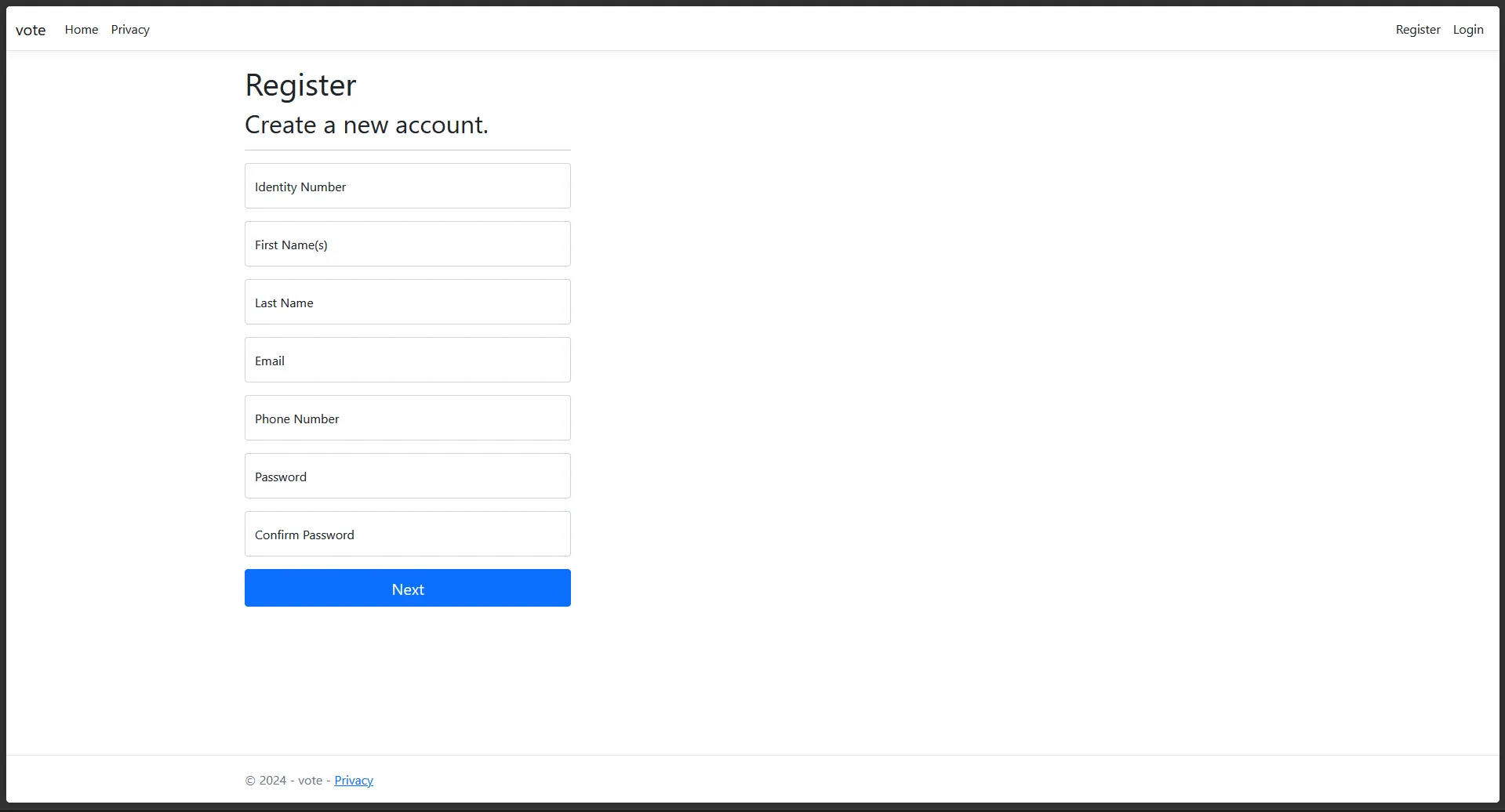
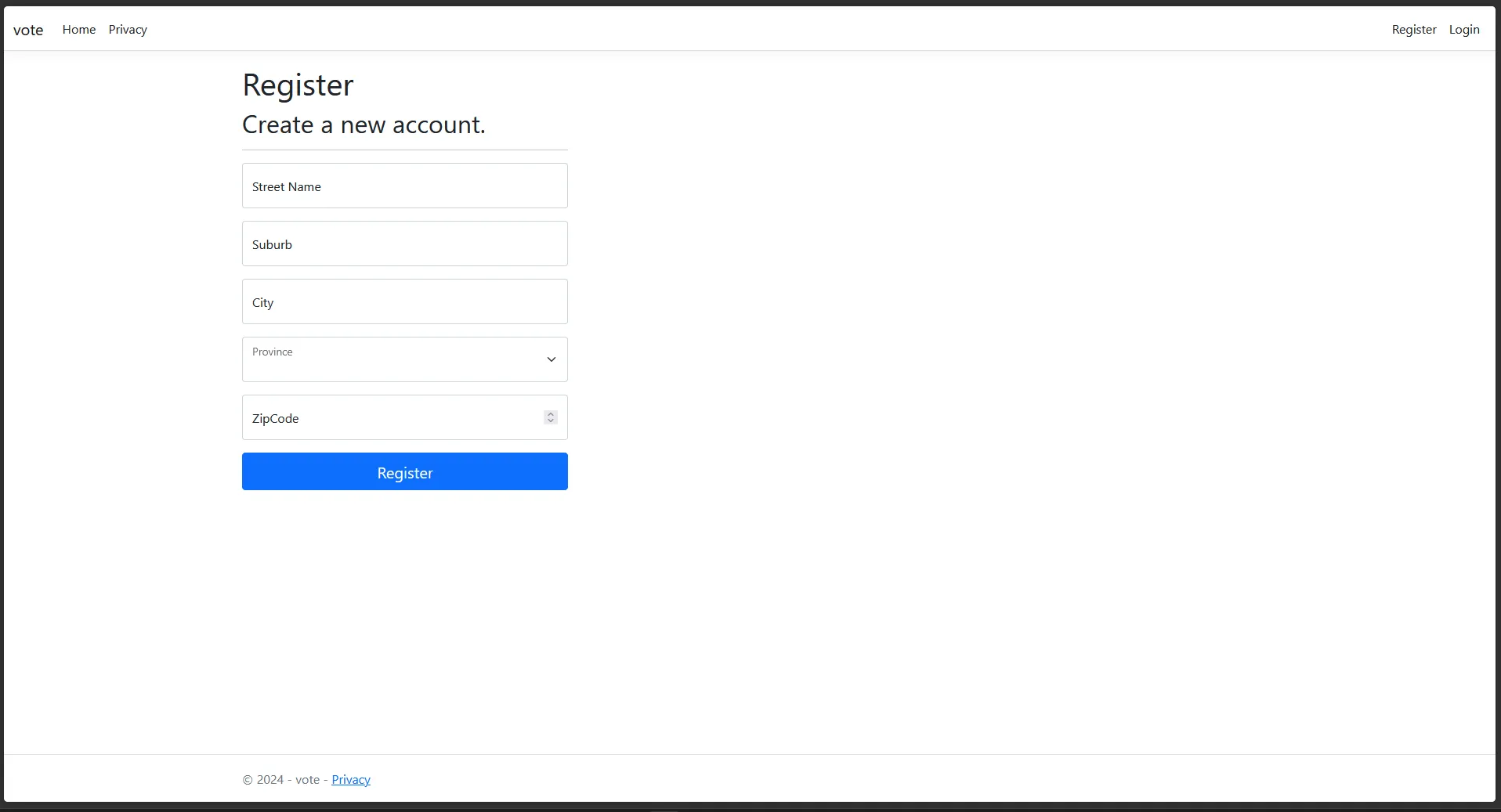
How did I achieve this? I stored every input value in a TempData object of equivalent name from the Register view and then retrieve them in the Submit.cshtml.
Register.cshtml.cs file
public async Task<IActionResult> OnPostAsync(string returnUrl = null)
{
    returnUrl ??= Url.Content("~/");
    ExternalLogins = (await _signInManager.GetExternalAuthenticationSchemesAsync()).ToList();

    if (ModelState.IsValid)
    {
        TempData["Email"] = Input.Email;
        TempData["FirstName"] = Input.FirstName;
        TempData["LastName"] = Input.LastName;
        TempData["IDNumber"] = Input.IdentityNumber;
        TempData["PhoneNumber"] = Input.PhoneNumber;
        TempData["Password"] = Input.Password;
        TempData["ConfirmPassword"] = Input.ConfirmPassword;

        return RedirectToPage("Submit");
    }

    // If we got this far, something failed, redisplay form
    return Page();
}
Submit.cshtml file
@page
@model SubmitModel
@{
	ViewData["Title"] = "Register";
	var email = TempData["Email"];
	var name = TempData["FirstName"];
	var surname = TempData["LastName"];
	var id = TempData["IDNumber"];
	var phone = TempData["PhoneNumber"];
	var password = TempData["Password"];
	var confirmPassword = TempData["ConfirmPassword"];
}
The overall problem with this approach is you will have to create multiple forms for every section which creates unnesccesary files when all the HTML code could be contained in a single file.
Approach 2
However, I soon realized that managing multiple views could become cumbersome. Therefore, I opted for a single view approach, utilising JavaScript or jQuery in this instance. This method allowed me to maintain a cleaner structure and improved code reusability. The jQuery code was provided by Omkar Bailkeri from a code base of 7 years ago at the time of this writing. I further edited some of the HTML code to fit my aestetics and plan to improve on it further at a later stage.
The basic functionality of the application still works. Here are the differences in backend and frontend code compared to Approach 1.
Register.cshtml.cs
public class InputModel
{
    [Required]
    [EmailAddress]
    [Display(Name = "Email")]
    public string Email { get; set; }

    [Required(ErrorMessage =
        "First name is required. You must enter your first names as they appear on your ID document.")]
    [MaxLength(128)]
    [Display(Name = "First Name(s)")]
    [RegularExpression(@"^[a-zA-Z\-éèêëÉÈÊË\s]+$", ErrorMessage = "Only letters, hyphens and spaces allowed")]
    public string FirstName { get; set; }

    [Required(ErrorMessage =
        "Last name is required. You must enter your last name as they appear on your ID document.")]
    [MaxLength(128)]
    [Display(Name = "Last Name")]
    [RegularExpression(@"^[a-zA-Z\-éèêëÉÈÊË\s]+$", ErrorMessage = "Only letters, hyphens and spaces allowed")]
    public string LastName { get; set; }

    [Required]
    [Display(Name = "Identity Number")]
    [StringLength(13, MinimumLength = 13, ErrorMessage = "ID number must be exactly 13 digits")]
    [RegularExpression(@"^\d{13}$", ErrorMessage = "ID number must contain only digits")]
    public string IdentityNumber { get; set; }

    [Required]
    [Display(Name = "Phone Number")]
    [StringLength(10, MinimumLength = 10, ErrorMessage = "Phone number must be 10 digits")]
    [RegularExpression(@"^0\d{9}$", ErrorMessage = "Phone number must start with 0 and be 10 digits")]
    public string PhoneNumber { get; set; }

    [Required]
    [Display(Name = "Street Name")]
    public string Street { get; set; }

    [Required]
    [Display(Name = "Suburb")]
    public string Suburb { get; set; }

    [Required]
    [Display(Name = "City")]
    public string City { get; set; }

    [Required]
    public Provinces Province { get; set; }

    [Required]
    [Display(Name = "Zip Code")]
    [StringLength(4, MinimumLength = 4, ErrorMessage = "Zip code must be 4 digits")]
    [RegularExpression(@"^\d{4}$", ErrorMessage = "Zip code must be numeric")]
    public string ZipCode { get; set; }

    [Required]
    [StringLength(100, ErrorMessage = "The {0} must be at least {2} and at max {1} characters long.",
        MinimumLength = 6)]
    [DataType(DataType.Password)]
    [Display(Name = "Password")]
    public string Password { get; set; }

    [DataType(DataType.Password)]
    [Display(Name = "Confirm password")]
    [Compare("Password", ErrorMessage = "The password and confirmation password do not match.")]
    public string ConfirmPassword { get; set; }

}

public async Task OnGetAsync(string returnUrl = null)
{
    ReturnUrl = returnUrl;
    ExternalLogins = (await _signInManager.GetExternalAuthenticationSchemesAsync()).ToList();
}

public async Task<IActionResult> OnPostAsync(string returnUrl = null)
{
    returnUrl ??= Url.Content("~/");
    ExternalLogins = (await _signInManager.GetExternalAuthenticationSchemesAsync()).ToList();
    if (ModelState.IsValid)
    {
        var user = CreateUser();

        user.FirstName = Input.FirstName;
        user.LastName = Input.LastName;
        user.IdentityNumber = Input.IdentityNumber;
        user.PhoneNumber = Input.PhoneNumber;
        user.Address = new Address
        {
            Street = Input.Street,
            Suburb = Input.Suburb,
            City = Input.City,
            Province = Input.Province,
            ZipCode = Input.ZipCode
        };

        await _userStore.SetUserNameAsync(user, Input.Email, CancellationToken.None);
        await _emailStore.SetEmailAsync(user, Input.Email, CancellationToken.None);
        var result = await _userManager.CreateAsync(user, Input.Password);

        if (result.Succeeded)
        {
            _logger.LogInformation("User created a new account with password.");

            var userId = await _userManager.GetUserIdAsync(user);
            var code = await _userManager.GenerateEmailConfirmationTokenAsync(user);
            code = WebEncoders.Base64UrlEncode(Encoding.UTF8.GetBytes(code));
            var callbackUrl = Url.Page(
                "/Account/ConfirmEmail",
                pageHandler: null,
                values: new { area = "Identity", userId = userId, code = code, returnUrl = returnUrl },
                protocol: Request.Scheme);

            await _emailSender.SendEmailAsync(Input.Email, "Confirm your email",
                $"Please confirm your account by <a href='{HtmlEncoder.Default.Encode(callbackUrl)}'>clicking here</a>.");

            if (_userManager.Options.SignIn.RequireConfirmedAccount)
            {
                return RedirectToPage("RegisterConfirmation",
                    new { email = Input.Email, returnUrl = returnUrl });
            }
            else
            {
                await _signInManager.SignInAsync(user, isPersistent: false);
                return LocalRedirect(returnUrl);
            }
        }

        foreach (var error in result.Errors)
        {
            ModelState.AddModelError(string.Empty, error.Description);
        }
    }

    // If we got this far, something failed, redisplay form
    return Page();
}
Register.cshtml
@page
@model RegisterModel
@{
    ViewData["Title"] = "Register";
}

<!-- multi-step Form -->
<div class="container-fluid" id="grad1">
    <div class="row justify-content-center mt-0">
        <div class="col-11 col-sm-9 col-md-7 col-lg-6 text-center p-0 mt-3 mb-2">
            <div class="card px-0 pt-4 pb-0 mt-3 mb-3">
                <h2><strong>@ViewData["Title"]</strong></h2>
                <p>Create a new account</p>
                <div class="row">
                    <div class="col-md-12 mx-0">
                        <form id="msform" asp-route-returnUrl="@Model.ReturnUrl" method="post">

                            <!-- progressbar -->
                            <ul id="progressbar">
                                <li class="active" id="account"><strong>Account</strong></li>
                                <li id="personal"><strong>Personal</strong></li>
                                <li id="address"><strong>Address</strong></li>
                            </ul>

                            <!-- fieldsets -->
                            <fieldset>
                                <div class="form-card">
                                    <h2 class="fs-title">Account Information</h2>
									<div class="form-floating mb-3">
										<input asp-for="Input.Email" type="email" class="form-control" autocomplete="username" aria-required="true" placeholder="name@example.com" />
										<label asp-for="Input.Email">Email</label>
										<span asp-validation-for="Input.Email" class="text-danger"></span>
									</div>
									<div class="form-floating mb-3">
										<input asp-for="Input.Password" class="form-control" autocomplete="new-password" aria-required="true" />
										<label asp-for="Input.Password">Password</label>
										<span asp-validation-for="Input.Password" class="text-danger"></span>
									</div>
									<div class="form-floating mb-3">
										<input asp-for="Input.ConfirmPassword" class="form-control" autocomplete="new-password" aria-required="true"/>
										<label asp-for="Input.ConfirmPassword">Confirm Password</label>
										<span asp-validation-for="Input.ConfirmPassword" class="text-danger"></span>
									</div>
                                </div>
                                <input type="button" name="next" class="next action-button" value="Next Step" />
                            </fieldset>

                            <fieldset>
                                <div class="form-card">
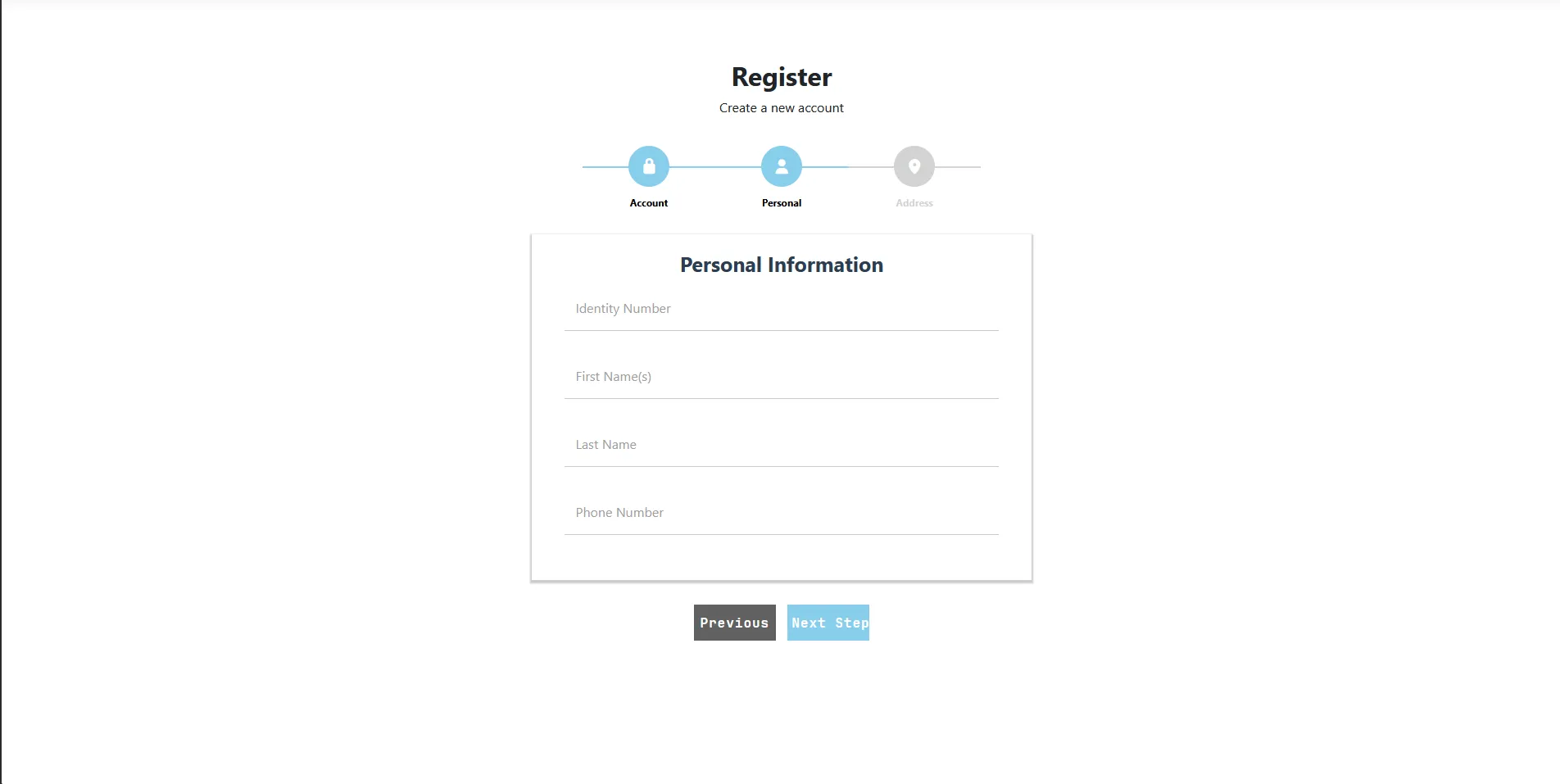
                                    <h2 class="fs-title">Personal Information</h2>

									<div class="form-floating mb-3">
										<input asp-for="Input.IdentityNumber" class="form-control" autocomplete="off" aria-required="true" placeholder="0000000000000" />
										<label asp-for="Input.IdentityNumber">Identity Number</label>
										<span asp-validation-for="Input.IdentityNumber" class="text-danger"></span>
									</div>
									<div class="form-floating mb-3">
										<input asp-for="Input.FirstName" class="form-control" autocomplete="firstname" aria-required="true" placeholder="John" />
										<label asp-for="Input.FirstName">First Name(s)</label>
										<span asp-validation-for="Input.FirstName" class="text-danger"></span>
									</div>
									<div class="form-floating mb-3">
										<input asp-for="Input.LastName" class="form-control" autocomplete="lastname" aria-required="true" placeholder="Doe" />
										<label asp-for="Input.LastName">Last Name</label>
										<span asp-validation-for="Input.LastName" class="text-danger"></span>
									</div>

									<div class="form-floating mb-3">
										<input asp-for="Input.PhoneNumber" class="form-control" autocomplete="tel" aria-required="true" placeholder="0725891454" />
										<label asp-for="Input.PhoneNumber">Phone Number</label>
										<span asp-validation-for="Input.PhoneNumber" class="text-danger"></span>
									</div>

                                </div>
                                <input type="button" name="previous" class="previous action-button-previous" value="Previous" />
                                <input type="button" name="next" class="next action-button" value="Next Step" />
                            </fieldset>

                            <fieldset>
                                <div class="form-card">
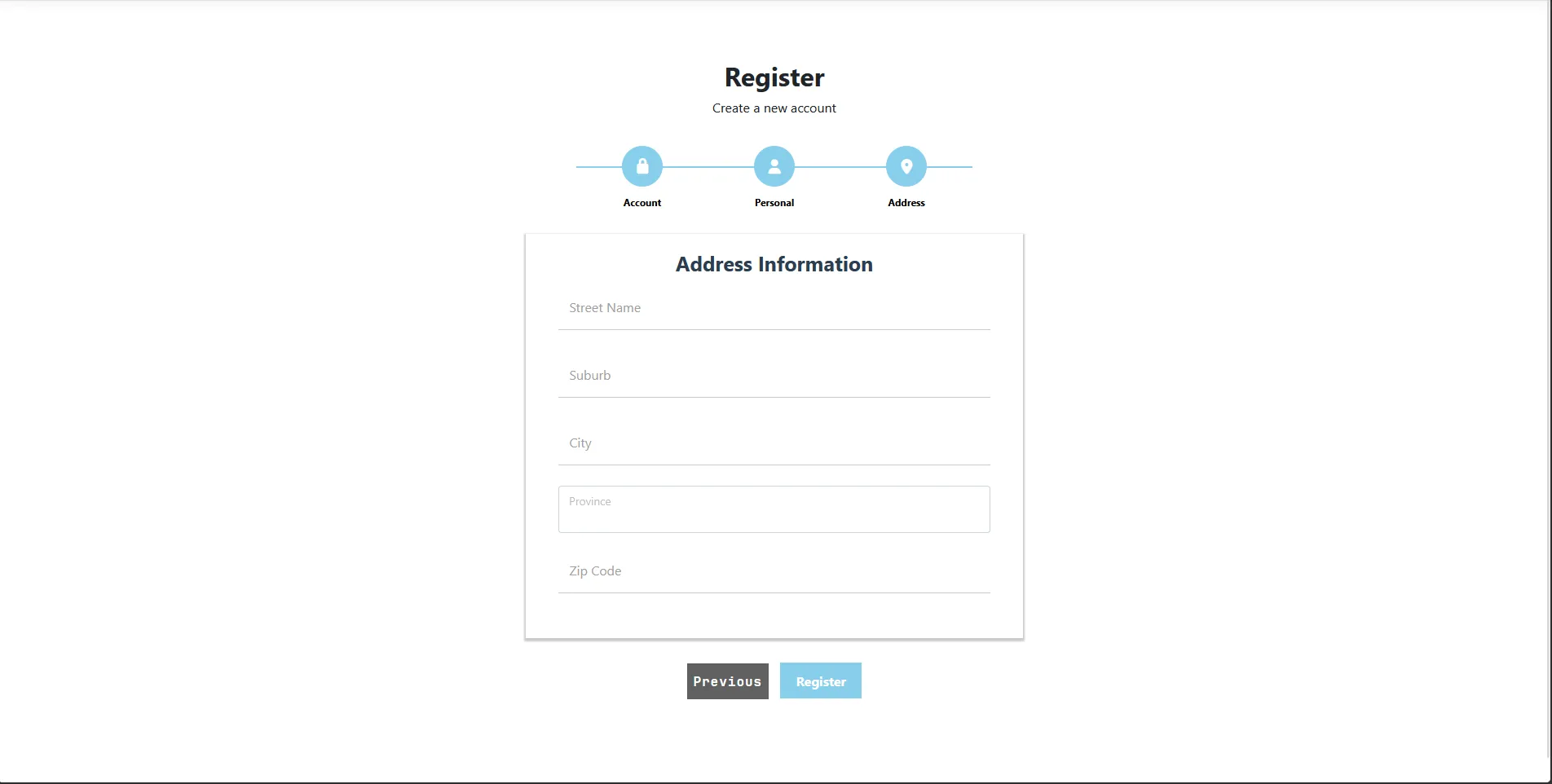
                                    <h2 class="fs-title">Address Information</h2>
									<div class="form-floating mb-3">
										<input asp-for="Input.Street" class="form-control" aria-required="true" autocomplete="street-address" placeholder="5372 Saint Street" />
										<label asp-for="Input.Street">Street Name</label>
										<span asp-validation-for="Input.Street" class="text-danger"></span>
									</div>
									<div class="form-floating mb-3">
										<input asp-for="Input.Suburb" class="form-control" aria-required="true" autocomplete="address-level2" placeholder="Linden" />
										<label asp-for="Input.Suburb">Suburb</label>
										<span asp-validation-for="Input.Suburb" class="text-danger"></span>
									</div>
									<div class="form-floating mb-3">
										<input asp-for="Input.City" class="form-control" aria-required="true" autocomplete="address-level2" placeholder="Johannesburg" />
										<label asp-for="Input.City">City</label>
										<span asp-validation-for="Input.City" class="text-danger"></span>
									</div>
									<div class="form-floating mb-3">
										<select asp-for="Input.Province" class="form-control" aria-required="true" >
											<option selected></option>
											<option value="0">Limpopo</option>
											<option value="1">Gauteng</option>
											<option value="2">Mpumalanga</option>
											<option value="3">Kwa-Zulu Natal</option>
											<option value="4">Eastern Cape</option>
											<option value="5">Western Cape</option>
											<option value="6">Northern Cape</option>
											<option value="7">North West</option>
											<option value="8">Free State</option>
										</select>
										<label asp-for="Input.Province">Province</label>
										<span asp-validation-for="Input.Province" class="text-danger"></span>
									</div>
									<div class="form-floating mb-3">
										<input asp-for="Input.ZipCode" class="form-control" aria-required="true" autocomplete="postal-code" placeholder="0001" />
										<label asp-for="Input.ZipCode">Zip Code</label>
										<span asp-validation-for="Input.ZipCode" class="text-danger"></span>
									</div>
								</div>
                                <input type="button" name="previous" class="previous action-button-previous" value="Previous" />
								<button id="registerSubmit" type="submit" class="next action-button">Register</button>
                            </fieldset>
                        </form>
                    </div>
                </div>
            </div>
        </div>
    </div>
</div>

@section Scripts {
    <partial name="_ValidationScriptsPartial" />

    <script>
	    $(document).ready(function(){

		    var current_fs, next_fs, previous_fs; //fieldsets
		    var opacity;

		    $(".next").click(function(){

			    current_fs = $(this).parent();
			    next_fs = $(this).parent().next();

			    //Add Class Active
			    $("#progressbar li").eq($("fieldset").index(next_fs)).addClass("active");

			    //show the next fieldset
			    next_fs.show();
			    //hide the current fieldset with style
			    current_fs.animate({opacity: 0}, {
				    step: function(now) {
					    // for making fieldset appear animation
					    opacity = 1 - now;

					    current_fs.css({
						    'display': 'none',
						    'position': 'relative'
					    });
					    next_fs.css({'opacity': opacity});
				    },
				    duration: 600
			    });
		    });

		    $(".previous").click(function(){

			    current_fs = $(this).parent();
			    previous_fs = $(this).parent().prev();

			    //Remove class active
			    $("#progressbar li").eq($("fieldset").index(current_fs)).removeClass("active");

			    //show the previous fieldset
			    previous_fs.show();

			    //hide the current fieldset with style
			    current_fs.animate({opacity: 0}, {
				    step: function(now) {
					    // for making fieldset appear animation
					    opacity = 1 - now;

					    current_fs.css({
						    'display': 'none',
						    'position': 'relative'
					    });
					    previous_fs.css({'opacity': opacity});
				    },
				    duration: 600
			    });
		    });

		    $(".submit").click(function() {
			    return false;
		    });

	    });
    </script>
}
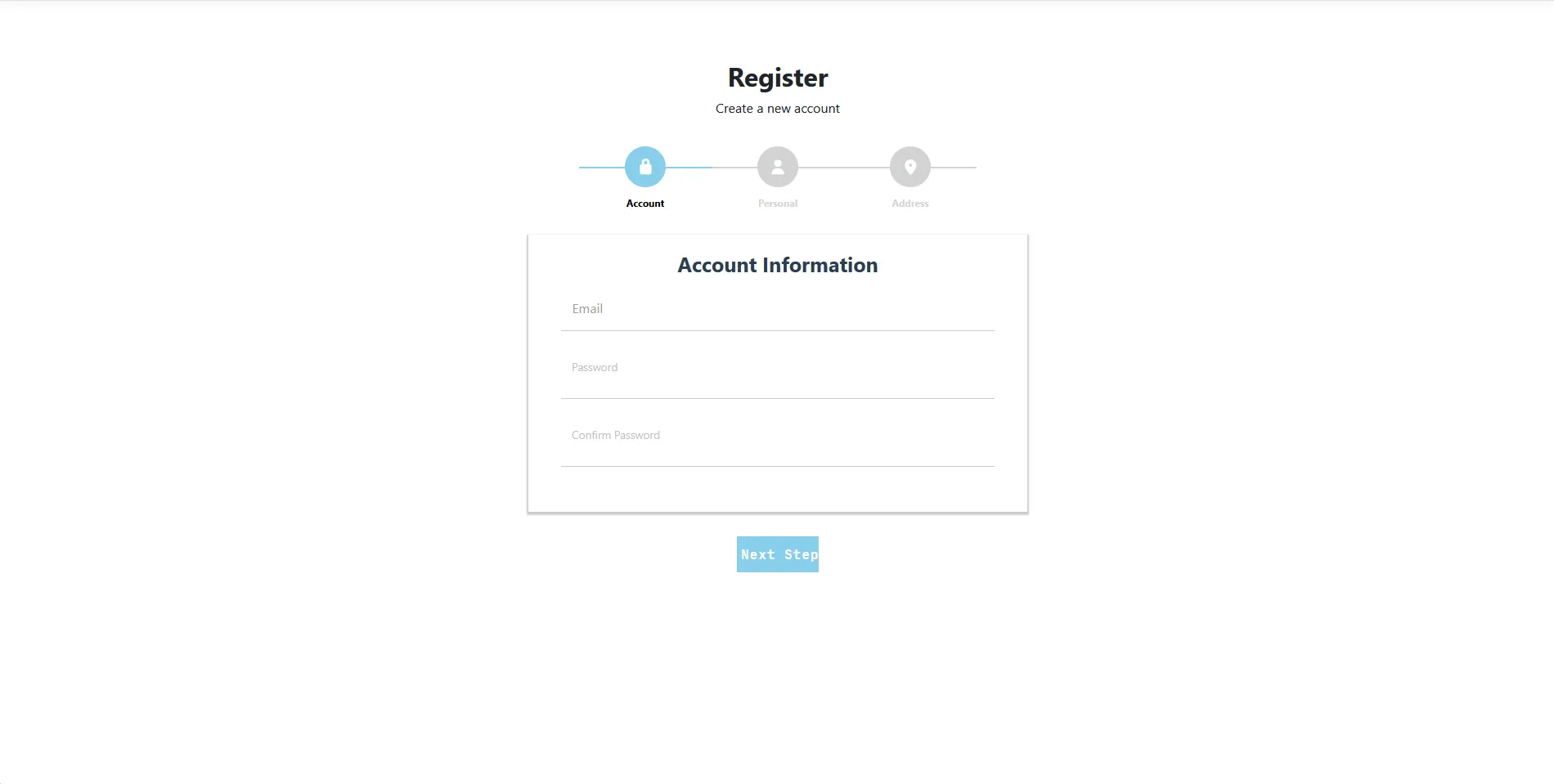
As you can see from the frontend code, everything is unified in one view file and is not split up. The key feature is the jQuery code that enables us to navigate to a new section after inserting information on the previous section. This is truly remarkable and a real time-saver.
Let us see how it looks:
Conclusion
Building multi-step forms in ASP.NET Core MVC can be efficiently achieved using a single view approach with JavaScript/jQuery. This method not only simplifies the code structure but also enhances user experience by providing a seamless registration process. By leveraging the power of ASP.NET Core MVC, JavaScript / jQuery, and Identity Framework, developers can create robust and user-friendly multi-step forms that cater to various application needs.
Last updated date on 22:52:47 31 October 2025 UTC